
Manage Your Email Notifications
Did you know you can customize the frequency of your Workday email notifications? Visit the Preferences page in your Profile to tailor them to your needs.
How to Update Your Preferences:
- Click your Profile Icon in the upper-right corner of Workday.
- Select Preferences.
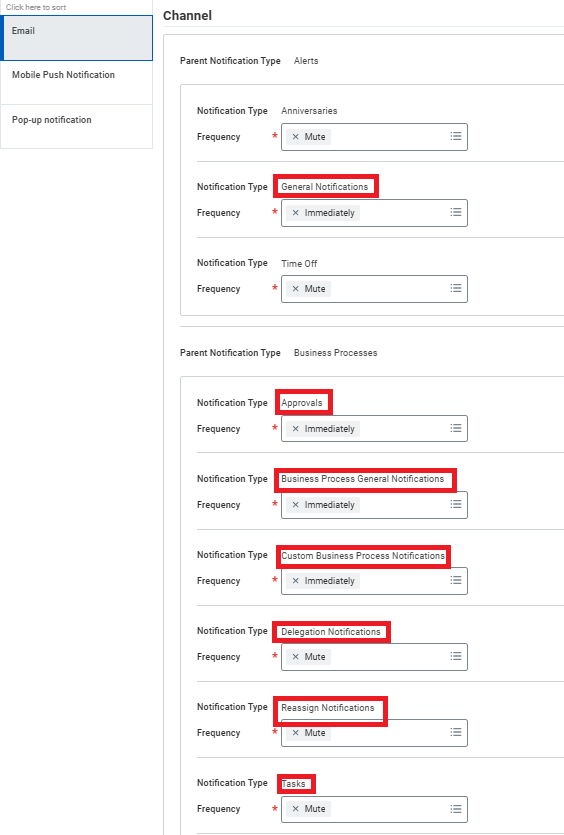
- Under Email Channel, choose your preferred notification frequency for Alerts and Business Processes.
Available Frequency Options:
- Daily – notifications are sent in one daily email (approximately 7am each morning)
- Immediately – notifications are sent to the Email Address for Business Processes viewable on the same page, or a Workday-enabled, mobile device upon receipt
- Mute – notifications are not forwarded through other methods beyond your Workday account
It is recommended reviewing and updating the frequencies for:
- General Notifications
- Approvals
- Business Process General Notifications
- Custom Business Process Notifications
- Delegations Notifications
- Reassign Notifications
- Tasks
Note: Some notification types may have fixed frequencies and cannot be changed.
For additional information you can access the the Manage Email Notifications Job Aid.
Newsletters
Introducing the Enhanced Change Job Experience
New Time Off and Leave Experience is Live!!!
Customer Alerts
- Advanced Lookup Tables Grid View Display Issue
- Change Job Recommendations Not Showing For New Change Job UI
- Resolved -WD1 Production Data Center Outage
- Resolved – Internal Server Error On Worksheets Using Dynamic Prompt Values
- Resolved – Delegated BP Approvals Ending In Error Or Failed Transactions
- Resolved – Comment Box Missing on Business Process Event
- Resolved – Supplier Settlement Bank Account Issue